

Download ReaConverter Lite ,Standard and Pro for Windows
Unlock the Power of Image Conversion with ReaConverter Pro
In the ever-evolving world of digital media, dealing with a myriad of image formats can be a daunting task. Whether you're a graphic designer, photographer, or simply someone who frequently works with images, having a reliable and efficient tool for image conversion is essential. Enter ReaConverter Pro, a powerful software designed to make image conversion and editing a breeze.
Why Choose ReaConverter Pro?
ReaConverter Pro stands out in the crowded market of image conversion tools due to its versatility, speed, and user-friendly interface. Let’s delve into some of the features that make this software a must-have for anyone dealing with image files:
- Wide Range of Supported Formats:
ReaConverter Pro supports an extensive list of image formats—over 600, to be precise. Whether you're dealing with common formats like JPEG, PNG, and TIFF, or more obscure ones, this software has you covered. This level of compatibility ensures that you can convert images without worrying about format limitations. - Batch Processing:
Time is money, and ReaConverter Pro understands that. It offers robust batch processing capabilities, allowing you to convert hundreds or even thousands of images at once. This feature is particularly useful for professionals who need to process large volumes of images quickly and efficiently. - Advanced Editing Tools:
Beyond conversion, ReaConverter Pro provides a suite of editing tools to enhance your images. You can perform tasks like resizing, cropping, rotating, and adjusting colors with ease. The software also supports adding watermarks and annotations, making it a comprehensive solution for image management. - User-Friendly Interface:
Despite its powerful features, ReaConverter Pro is designed with simplicity in mind. The intuitive interface ensures that both beginners and experienced users can navigate the software without a steep learning curve. The drag-and-drop functionality further streamlines the image conversion process. - Automation Features:
For users who handle repetitive tasks, ReaConverter Pro offers automation features. You can set up scripts and schedule conversions to run at specific times, freeing you from manual intervention and boosting productivity. - Integration and Plugins:
ReaConverter Pro seamlessly integrates with Windows Explorer, allowing you to convert images directly from the context menu. Additionally, the software supports command-line operations and offers plugins for more advanced functionalities.
Conclusion:
In summary, ReaConverter Pro is more than just an image converter; it's a comprehensive tool that simplifies image management and enhances productivity. Whether you're looking to convert a single image or process an entire photo library, ReaConverter Pro provides the flexibility and power needed to get the job done efficiently.
If you’re in the market for a reliable, feature-rich image conversion tool, ReaConverter Pro is undoubtedly worth considering. Embrace the ease of managing your image files and experience the difference today!
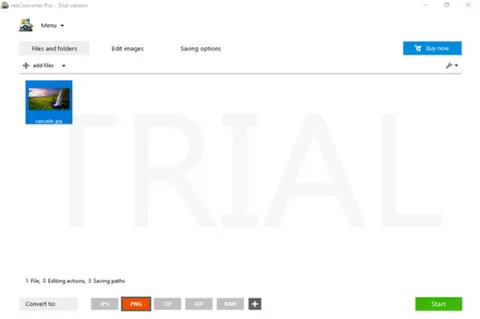
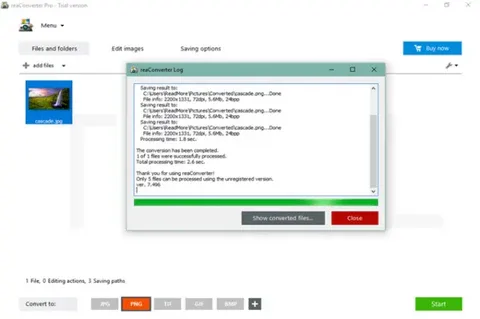
Title: ReaConverter Pro 8.0.254
File name: reaConverterPro-Setup.exe
File size: 401.56 MB
Supported OS: Windows XP, Vista, 7, 8, 10, 11, Server 2003 — 2022.
Languages: Multiple languages
License: TRIAL.
Date added: October 16, 2026.
Developer: ReaSoft Development
Website: www.reaconverter.com
Category: Windows Apps, Multimedia, Graphic, Image Converters.